

The Logitech K400 wireless TV keyboard is a game-changer for anyone tired of typing passwords with a TV remote. At just 29.90 euros, it offers a simple solution to a common frustration: entering credentials on smart TVs.
With built-in touchpad and multimedia controls, this keyboard makes navigating streaming apps a breeze. Whether you're logging into Netflix or searching for a YouTube video, the K400 saves time and hassle.
Find Original Home Decor sparking conversation at Grand Goldman Shop.

Why the Logitech K400 Stands Out
Typing on a TV remote is notoriously slow and clunky. The K400 eliminates that pain by providing a full keyboard and touchpad in a compact design. It's not just for TVs—it also works with PCs, adding versatility.
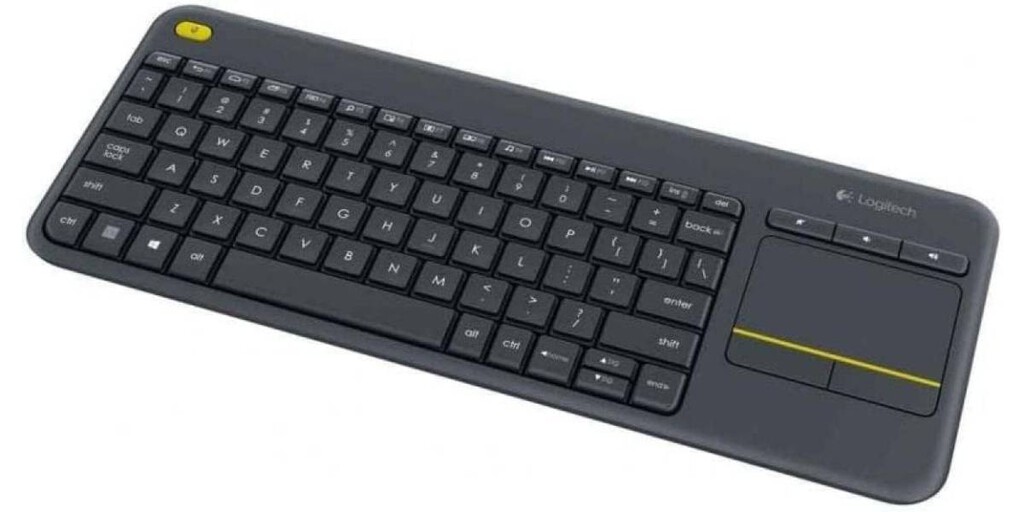
Priced affordably, it's a practical accessory for any household with multiple devices. The keyboard runs on two AA batteries that last up to 18 months, so you won't be constantly swapping them out.
Key Features and Benefits
- Wireless freedom: Connect via USB receiver and use from across the room.
- Integrated touchpad: Navigate menus and cursor control without a separate mouse.
- Multimedia keys: Quick access to volume, play/pause, and other functions.
- Long battery life: Up to 18 months on two AA batteries.
- Broad compatibility: Works with Windows, Android, and ChromeOS.
These features make the K400 a versatile tool for both entertainment and productivity.
Compatibility and Limitations
The K400 supports Windows 7, 8, and 10, as well as Android and ChromeOS. However, it's not compatible with Apple devices or Mac computers. If you're in an Apple ecosystem, you'll need to look elsewhere.
For everyone else, it's a plug-and-play solution. Just connect the USB receiver and start typing. The longer history behind the story is traced in Logitech K400 Keyboard Deal: Type Easily on Your Smart TV.
Comparison with Other Input Methods
| Device | Ease of Typing | Navigation | Price | Battery Life |
|---|---|---|---|---|
| TV Remote | Very difficult | Basic | Included | Varies |
| Logitech K400 | Easy | Touchpad | ~29.90 EUR | Up to 18 months |
| Universal Remote | Difficult | Basic | Varies | Varies |
| Smartphone App | Moderate | Touchscreen | Free | N/A |
As the table shows, the K400 offers a significant improvement in typing and navigation for a low one-time cost. The background to this story is set out in Framework's New Wireless Touchpad Keyboard for HTPC and Raspberry Pi. A related thread runs through Carrefour TV Deals: Save VAT on 5 Top Smart TVs Today. Earlier coverage in Corsair Vanguard 96 Wireless Keyboard Hits First Amazon Deal shows how the argument developed.
Who Should Buy the Logitech K400?
This keyboard is ideal for families with smart TVs, frequent streamers, and anyone who values convenience. It's also great for HTPC setups or as a backup keyboard for a desktop. A closer look at the same subject appears in Corsair K65 Plus Wireless Prime Day Deal: Compact Gaming Keyboard. Anyone following the wider picture can start with G-LAB Keyz Elite 300 GRG Review: Wireless Mechanical Keyboard for Gaming. The same theme surfaces in G-Lab KEYZ Elite 300 & 400 Wireless Mechanical Keyboards Hit Spain, which takes a different angle.
If you often struggle with on-screen keyboards or slow remote input, the K400 is a worthwhile investment. Context on how this played out before sits in Homemade Christmas Gifts: 7 Easy DIY Ideas for Anyone. A companion piece, Trending: latest articles, approaches the same subject from another angle.
FAQ
Is the Logitech K400 compatible with smart TVs?
Yes, it works with most smart TVs that support USB keyboards. Simply plug the receiver into a USB port and start typing.
Does it work with Mac computers?
No, the K400 is not compatible with Mac or Apple devices. It supports Windows, Android, and ChromeOS.
How long do the batteries last?
The two AA batteries can last up to 18 months under normal usage, depending on usage patterns.
Can I use it with a PC?
Absolutely. The K400 works with PCs running Windows, as well as Android and ChromeOS devices, making it a versatile peripheral.







